Your guide to statements at tax time
The rundown
- Learn about how you can access your statements.
- Find the answers to frequently asked questions about tax time.
What statements are available?
The following statements are now available:
- Financial Year Summary: An overview of your CommSec account for the year, including summaries of your portfolio valuation, estimated interest and dividends, fees and charges. A summary of the total payment received from the CommSec Yello Investing benefit is also included.
- Portfolio Valuation: A report of your CommSec holdings and their values as at 30 June, giving you a year-end snapshot of your position.
- Transaction Summary: A list of your executed trades with CommSec, to help you work out your capital gains and losses, and transaction costs.
- Interest and Estimated Dividend Summary: A list of estimated dividend and interest payments which may help you work out the income performance of your portfolio.
How to download your statements
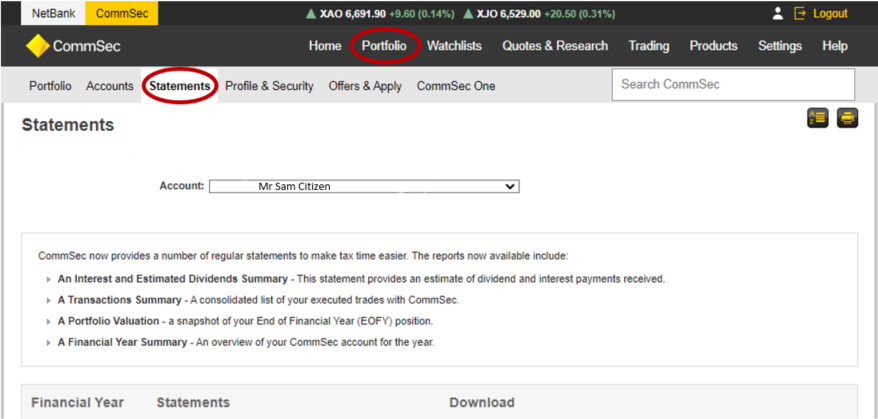
You can access your Statements here, or alternatively, log into CommSec and select Portfolio > Statements on the homepage.
Frequently asked questions
To view your statements, log in to CommSec, go to Portfolio, select Statements and then choose your trading account.
All End of Financial Year Statements are available in PDF format. The Transaction Summary Statement is also available in CSV format.
The easiest way to get your statement is by logging into the website and navigating to Portfolio > Accounts > Statements.
Please contact us to discuss your options.
The end of financial year share statement only captures CommSec CHESS sponsored holdings. If you have Issuer Sponsored Holdings or holdings with another broker, they will not be included in this summary.
Other fees can include, but are not limited to:
- Off Market Transfer fees
- Settlement fees
- Fail fees
- Shareholder Reference Number (SRN) query
- Rebooking fees
- Cheque payment fee or cheque dishonour fees
- Printing and posting contract notes
Your CDIA Statement and Interest Summary can be downloaded by logging into your Netbank account. You can also access Netbank from CommSec (if you are logged in) by using the Netbank link located in the top left of the screen.
To view your CDIA Statements, select View accounts, then Statements, then click on the drop down arrow next to 'View statements for' and choose your CDIA account.
To view the total interest received for the financial year, select View accounts, then Account information, and then select your CDIA account from the drop down menu.
If you need help finding your CDIA statement, please call CommSec on 13 15 19. For more ways to get in touch, visit our Contact us page.