


Cyber security, scams & fraud
Keep your CommSec account and devices secure.

Protecting you is our priority
CommSec will never ask you to share your CommSec credentials with us. To avoid exposure to scams and fraud, it's important that you never share your CommSec credentials, such as your Client ID or password with anyone including CommSec, third parties, trusted organisations or family and friends.
Scams & fraud
Scams
Scammers gain your trust in order to steal your money or information.
Discover the latest scams, how to spot them and what to do if you've been scammed.
Fraud
Account fraud usually happens when somebody accesses your personal/account information without your knowledge or authority.
Find out how to protect yourself from fraud.
Learn about the latest scams
October 2026
CommSec Branded Phishing Scam
CommSec has been alerted to a phishing scam where customers are receiving emails that appear to be from CommSec, asking them to validate their login details following an alleged sign-in attempt detected on their account.
The email asks customers to click on a link which directs customers to a fake CommSec-branded webpage where they are asked to enter their CommSec Client ID and verify their details to secure their account. Once details are entered, scammers may gain access to a customers’ account.
This email is not from CommSec.
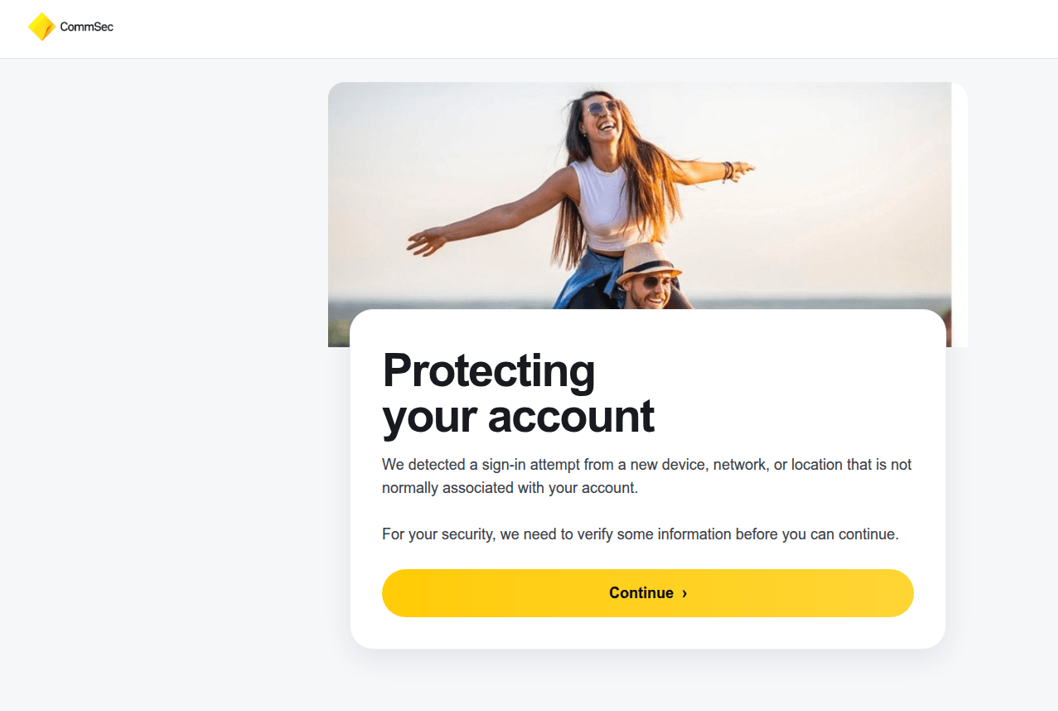
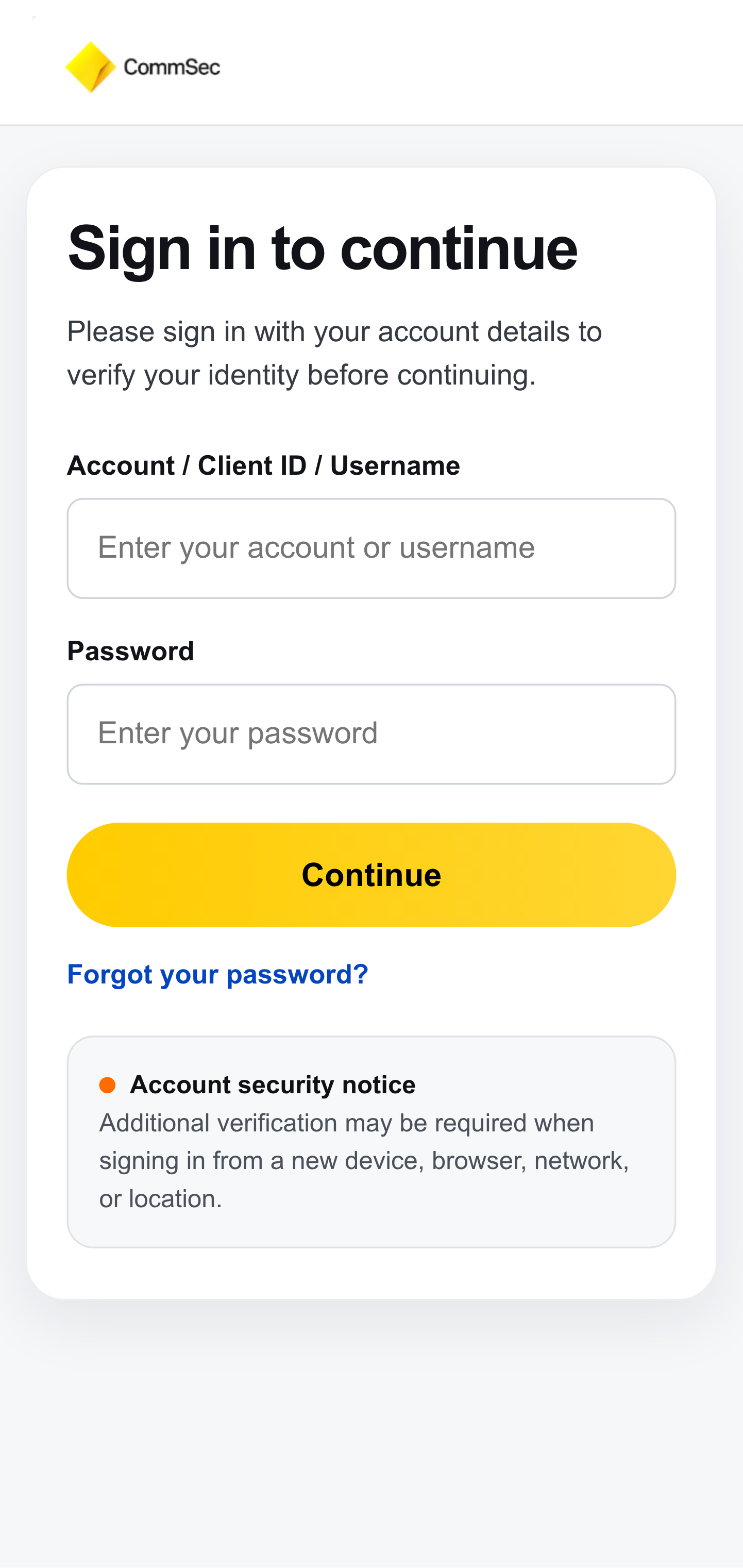
CommSec will never ask you via email, social media or SMS to click on a link to verify your details. If CommSec requires you to login, you will be asked to login via the CommSec website or the CommSec app.
Customers should ensure they’re using a legitimate website before entering any personal or banking details.
Recovery / Remote Access Scam
CommSec has been alerted to a recovery/remote access scam where scammers contact people who have previously lost money through an investment scam. The scammer offers to help reclaim the lost investment, often claiming the funds or shares have been located and have significantly increased in value. They may present themselves as a share dealer or recovery specialist and promise to return the money once certain steps are completed.
These scammers ask to accept a remote access request, such as AnyDesk, so they can access your device and online banking or CommSec account. They then tell you to deposit money for verification or pressure you to sell shares to release funds.
Never give an unexpected caller remote access to your device or allow them to operate your accounts.
Re-Selling Sites / Payment Scam
CommSec has been alerted to an emerging payment scam targeting customers who use online resale platforms.
In this scam, a prospective buyer contacted a customer selling clothes on Depop and directed them to a website impersonating CommBank.
The fake CBA-branded website then asked the customer to verify their banking details to receive payment.
As scams become more sophisticated and harder to spot, it's important to Stop. Check. Reject. any unexpected messages, calls and emails.
Investment Scam Warning: the signs to look for
An investment scam is when a scammer convinces you to put your money into an investment that isn’t what it claims to be, with the aim of stealing your money. It can happen when you’re simply looking for a way to grow your savings or make some extra money.
The challenge is that these scams can look convincing.
Scammers can use trusted brands, AI-generated celebrity deepfakes, fake investment platforms and messaging groups to make fake investment opportunities appear legitimate.
Unexpected contact via social media, pressure to invest quickly and promises of large or guaranteed returns are all key warning signs of a scam.
They are also impersonating trusted financial brands, including CommSec. Sometimes it can look remarkably authentic. They may use our colours, our logo and variations of our name to appear legitimate. This is not CommSec.
CommSec does not provide personal financial advice. We will never make a recommendation on a specific stock or investment. We will never invite you to join a messaging group such as WhatsApp, nor will we ask you to download the CommSec app via social media.
CommSec’s advice is to: “Stop, Check and Reject”
Stop. Check. Reject.
If you are approached about an investment out of the blue, asked to act quickly or promised returns that seem too good to be true, CommBank's advice is to always stop, check and reject – even if it looks or sounds legitimate.
- Stop interacting. Don't send money, don't hand over your information and don't act on pressure to invest quickly.
- Check independently. Look up the investment and who is offering it using official websites and registers – not links or contact details they’ve given you. Talk to someone you trust before investing. Searching the investment name alongside words such as "scam", "review", "complaint" or "warning" can also help.
- Reject If something doesn’t feel right, don’t proceed. Stop contact with the person.
Customers who are unsure whether they are genuinely dealing with CommSec should check through the official CommSec website.
If you’ve clicked on a link, entered your details, or made a payment, contact us immediately on 13 15 19.
You can also receive out of hours support on 13 22 21 via CommBank Safe.
Received a suspicious message but haven’t engaged with it? You can report it to hoax@cba.com.au.
Scam alert: Fake social media posts
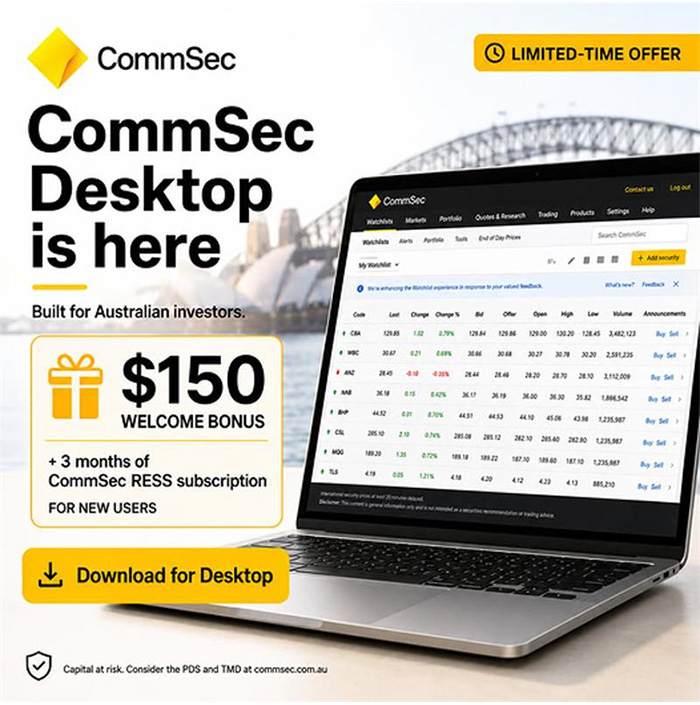
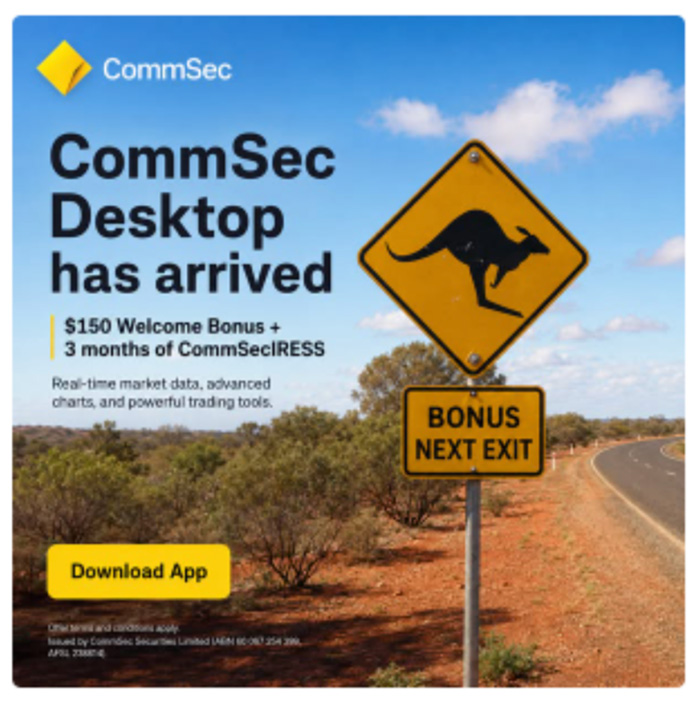
We are aware of fake social media posts asking CommSec customers to download an app. This is a scam and not from CommSec. We’ll never ask you to download an app via social media. Remember to Stop, Check and Protect.
If you’ve clicked on a link, entered your details, or made a payment, contact us immediately on 13 15 19.
You can also receive out of hours support on 13 22 21 via CommBank Safe.
Received a suspicious message but haven’t engaged with it? You can report it to hoax@cba.com.au.
Watch out for fake investment scams
We’re aware of an increase in investment scams using fake social media ads and posts that impersonate CommSec. These scams may use fake ads, misleading posts or deepfake images that falsely feature public figures, including former CommSec market analyst Tom Piotrowski, as well as other economists, executives and journalists.
The posts often direct people to external investment websites or social media or messaging groups, including WhatsApp groups, where they’re encouraged to invest in specific shares. In some cases, scammers promote low-liquidity stocks to artificially drive up the share price. Scammers will then typically use mules or compromised accounts to sell at the inflated price. This is known as “Pump & Dump” activity and can result in significant losses when the share price falls.
CommSec will never ask you to join a social media or messaging group, or direct you to an external investment site to recommend a specific share or investment opportunity. CommSec also does not provide personal investment advice or recommend specific securities.
To help protect yourself, be wary of social media ads, posts or messages that claim to offer exclusive investment opportunities, use public figures to promote a stock, or direct you to external websites or chat groups.
Cash holdings transfer scam
Customers have reported scam activity where scammers are telling them to move their cash holdings to a “new and safe” bank account because their current account is compromised.
CBA and CommSec will never ask you to transfer cash into a new and/or safe bank account while we complete any investigation into suspected scam or fraud activity.
Investment loan scams
Customers have reported that scammers are recruiting investors and encouraging them to take out loans to purchase shares. Scammers are using investors for ‘Pump & Dump’ schemes targeting ASX and international listed stocks.
‘Pump & Dump’ is a form of market manipulation. These scams persuade investors to buy specific stocks to inflate the share price and then the scammers can sell into this inflated price. The share price then falls, leaving investors with losses.
Facebook pages and WhatsApp groups scams
There is increasing scam activity on social media trying to persuade investors to buy specific stocks. This is part of ‘Pump & Dump’ schemes targeting ASX and international listed stocks.
Stay alert and be cautious of investment scams via social media trying to recruit investors.
Can you spot a tax scam?
Scammers are sending fake ‘tax refund’ and ‘urgent payment’ texts and emails that can look like they’re from the ATO or myGov. Some might include fake links, QR codes, payment threats or refund offers.
Signs of a scam:
- Messages asking you to log in through a link
- Asking you to share passwords, PINs or sensitive information via message or social media
- Urgent payment requests and demands
If something feels off, don’t click the link or reply. Always verify notifications are legitimate by logging in via the official MyGov or ATO website. Never share passwords, PINs, one-time-passwords or sensitive information.
Fake crypto trading platforms
We're seeing an increase in scams involving fake cryptocurrency trading platforms. These are promoted through social media ads and posts, encouraging victims to join online 'share trading' or 'stock tips' groups where scammers impersonate well-known investors or financial experts
Victims are directed to fake trading platforms that use false account growth and activity. When they try to withdraw money, scammers ask for extra payments such as tax, release, or withdrawal fees. These payments go directly to the scammers, and victims do not get their money back.
Be cautious of offers that seem too good to be true, unexpected investment opportunities, or requests to send money to individuals.
Remember to Stop. Check. Reject. Stop and verify sources and check reviews before committing to anything. Reject any offer that pressures you to act quickly or share personal details.
Scam alert: Fake “SpaceX IPO” emails
08/06/2026
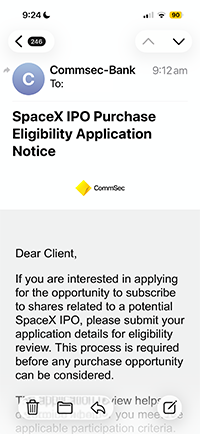
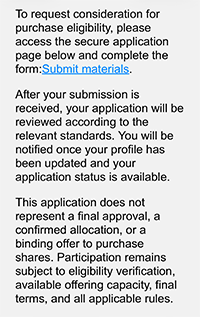
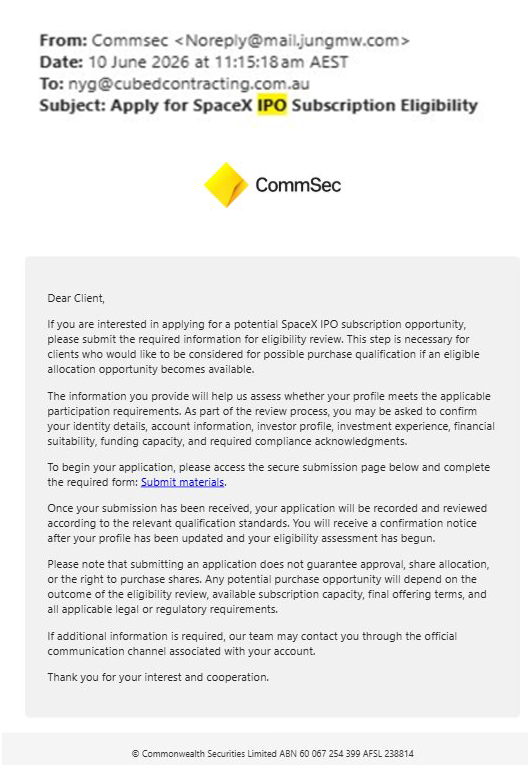
We’ve been alerted to a phishing scam involving emails promoting a “SpaceX IPO”. These emails are not legitimate and are not associated with CommSec or any official investment offering.
What’s happening?
- Scammers are sending emails claiming to offer access to a “SpaceX IPO”.
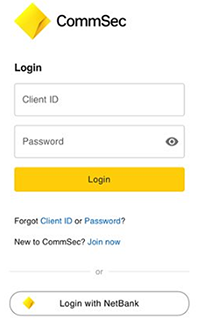
- These emails may include links to fake websites, forms and login pages.
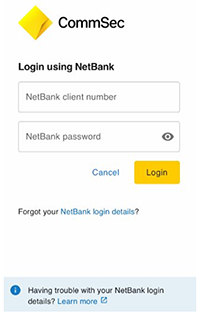
- Their goal is to trick you into sharing personal or account details (e.g. Driver’s Licence, mobile numbers, CommSec and NetBank login IDs and passwords).
How to spot the scam
Be cautious if you receive an email that:
- Promotes a high-profile or exclusive investment opportunity (like a SpaceX IPO).
- Urges you to act quickly or “secure your spot” rather than referring you to the CommSec website.
- Contains links to unfamiliar websites, including login pages and encourages you to click on the link.
- Asks for personal, financial, or login details.
- Is sent from an unofficial email address.
How to stay safe
- Do not click any links or download attachments from the email.
- Do not share any personal or account information.
- Delete the email immediately.
Important to know
- CommSec will never ask for sensitive information via email, text or WhatsApp.
- CommSec will never send you a communication with a link to login directly to our online services.
- Official investment opportunities related to SpaceX IPO will always be communicated through trusted CommSec channels with emails being sent from CommSec@msg.email.commsec.com.au
- Always go directly to the CommSec website or app and log in to take action.
Investment scams are increasing
14/08/2026
Online investing is more accessible than ever, but not all opportunities are genuine. Scammers often use social media, ads and messaging apps to promote fake investments.
Common warning signs
- Ads featuring celebrity or public figure endorsements, which may be fake or AI-generated
- Fake platforms showing high returns to encourage further investment
- Requests to send money via unusual methods like cryptocurrency or multiple accounts
- Being asked to pay fees or deposits to access or withdraw your money
How to protect yourself
- Stop: Take time before making decisions and don’t rush under pressure
- Check: Research the investment and verify the company independently
- Protect: Be cautious with large amounts and your superannuation
If something feels off, it could be a scam. Stay alert and protect your money.
June 2026
Scam alert: Investment scam targeting Bitcoin
19/06/2026
We're aware of a sophisticated scam targeting customers investing in Bitcoin Exchange Traded Funds (ETFs)
How the scam works
Scammers may:
- Contact you unexpectedly (phone, email or online) posing as investment advisers or claim to be investment advisers via a WhatsApp groups, email or Facebook pages. CommSec will never provide investment advice via Facebook, WhatsApp or any other social media platform.
- Build trust over time by developing rapport and appearing credible
- Pressure you to invest in Bitcoin ETFs (or other specifics) often promising high or guaranteed returns
- Instruct you to convert your holdings from CHESS to Issuer sponsorship using online processes
- Arrange for your investments to be redeemed and transferred into Bitcoin
In some cases, customers have been:
- Given instructions and scripts to read to the bank to avoid triggering security checks
- Encouraged to act urgently or keep the investment confidential
- Coached as to what steps to complete, what to say and what to do to ensure the scammers get access to the international wallet / bitcoin
Warning signs
Be alert if you
- Receive unsolicited investment advice or offers or are invited to join a WhatsApp Group
- Feel pressured to act urgently
- Are given specific instructions to move or convert your investments
- Are told what to say to your bank or adviser
How to protect yourself
- Do not act on unsolicited investment advice or investment advice received via social media / WhatsApp Group
- Always verify who you are dealing with using independent contact details
- Be cautious of requests to change how your investment is held or transferred
- Take time to seek trusted financial advice before making any decisions
- If you don't understand a product or ETF features, do not invest – and never rely on strangers for guidance
If you think you’ve been targeted
- Stop any transactions immediately
- Contact us as soon as possible
Key message
If someone is guiding you step-by-step on how to move your investment, or telling you what to say to your bank, it’s a strong sign of a scam.
Watch out for fake investment scams
We’re aware of an increase in investment scams using fake social media ads and posts that impersonate CommSec. These scams may use fake ads, misleading posts or deepfake images that falsely feature public figures, including former CommSec market analyst Tom Piotrowski, as well as other economists, executives and journalists.
The posts often direct people to external investment websites or social media or messaging groups, including WhatsApp groups, where they’re encouraged to invest in specific shares. In some cases, scammers promote low-liquidity stocks to artificially drive up the share price. Scammers will then typically use mules or compromised accounts to sell at the inflated price. This is known as “Pump & Dump” activity and can result in significant losses when the share price falls.
CommSec will never ask you to join a social media or messaging group, or direct you to an external investment site to recommend a specific share or investment opportunity. CommSec also does not provide personal investment advice or recommend specific securities.
To help protect yourself, be wary of social media ads, posts or messages that claim to offer exclusive investment opportunities, use public figures to promote a stock, or direct you to external websites or chat groups.
Cash holdings transfer scam
Customers have reported scam activity where scammers are telling them to move their cash holdings to a “new and safe” bank account because their current account is compromised.
CBA and CommSec will never ask you to transfer cash into a new and/or safe bank account while we complete any investigation into suspected scam or fraud activity.
Investment loan scams
Customers have reported that scammers are recruiting investors and encouraging them to take out loans to purchase shares. Scammers are using investors for ‘Pump & Dump’ schemes targeting ASX and international listed stocks.
‘Pump & Dump’ is a form of market manipulation. These scams persuade investors to buy specific stocks to inflate the share price and then the scammers can sell into this inflated price. The share price then falls, leaving investors with losses.
Facebook pages and WhatsApp groups scams
There is increasing scam activity on social media trying to persuade investors to buy specific stocks. This is part of ‘Pump & Dump’ schemes targeting ASX and international listed stocks.
Stay alert and be cautious of investment scams via social media trying to recruit investors.
Shareholder takeover scam activity
Customers have reported scam activity involving unauthorised changes to shareholdings, aimed at gaining control of investor assets. Scammers may initiate changes through share registries or transfer holdings as part of an identity takeover attempt.
Always review account alerts carefully and contact us if you notice unexpected changes to your holdings.
Fraudulent registry profile scams
CommSec is aware of scam activity where unauthorised parties create or access share registry profiles using stolen personal information. This may allow scammers to update account details or access holdings without your knowledge.
Only access registry accounts via official websites and report any unfamiliar profile activity.
Unauthorised trading account scams
CommSec has detected scam activity involving attempts to create trading accounts using compromised customer details. These accounts may be used to gain unauthorised access or transact on existing shareholdings.
Stay alert for unexpected account alerts or login activity and contact us immediately if something doesn’t look right.
Dividend redirection scams
CommSec has been alerted to scams involving unauthorised changes to dividend payment instructions. Scammers may update bank details via a registry or linked profile, redirecting payments.
Regularly review your payment details and follow up promptly if expected dividends are not received.
Postal address manipulation scams
Scam activity involving unauthorised changes to postal address details linked to shareholdings have been identified. This may allow scammers to intercept important communications and support further account access.
Ensure your contact details are up to date and immediately report any changes you didn’t request.
AI impersonation scams
We’re aware of scam activity where criminals use AI technology to impersonate customers and gain access to accounts.
These scams may involve highly convincing phone calls or interactions designed to pass identity checks and take control of accounts. Once access is gained, scammers may attempt to change passwords, update account details or initiate transactions.
Be cautious of unexpected or unusual requests and contact us immediately if something doesn’t feel right.
Identity takeover scam activity
CommSec has been alerted to increased identity takeover scam activity designed to capture personal information and gain unauthorised access to financial accounts.
Scammers may obtain personal details through data breaches, phishing emails, compromised devices or other online activity. They may then attempt to reset passwords, open accounts, or contact financial institutions while impersonating the customer.
Customers are often unaware until they notice unexpected account activity or unfamiliar credit enquiries.
Online marketplace payment phishing scams
CommSec has detected phishing scams targeting customers using online buying and selling platforms, designed to capture online banking login details.
The scam typically involves a buyer or seller requesting payment via bank transfer or PayID and sending a fake email or SMS message that appears to be from a bank. Customers are prompted to “verify” their account by entering their login details on a fraudulent website.
Once details are entered, scammers can access linked accounts. Customers should ensure they are using a legitimate website before entering any personal or banking details, and avoid logging in via links sent in email or SMS messages.
Mobile phone data risks
CommSec is aware of scam activity involving personal information stored on discarded mobile phones.
If a device has not been properly reset before disposal, stored data, including access to email or financial apps, may be accessed and misused.
Customers should ensure personal information is removed before disposing of any device.
Public Wi-Fi account compromise scams
CommSec has detected scam activity involving compromised email accounts after customers have used unsecured public Wi-Fi networks.
If scammers gain access to an email account, they may attempt to reset passwords and access other services while impersonating the customer.
Unexpected login alerts or password reset notifications may be an early warning sign.
Remote access “virus alert” scam
CommSec has detected scam activity involving fake “virus alert” pop-ups designed to trick customers into granting remote access to their computer.
The message typically claims the device is infected and instructs the customer to call a phone number for urgent support. The scammer then asks for remote access to “fix” the issue.
If access is granted, scammers can take control of the device, access email accounts and attempt to access banking or other financial services.
A Minor Trust Account must be opened by an adult, who can be a parent, guardian, grandparent or other family member over 18 years of age. A child cannot create an account on their own, nor can they access or trade through the account themselves.
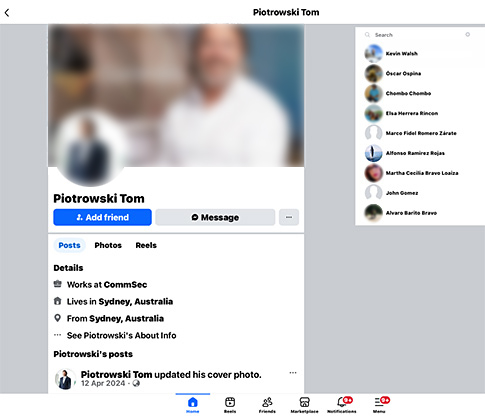
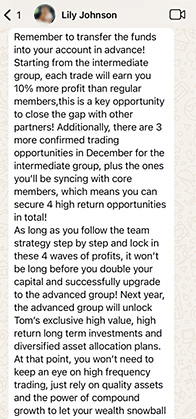
Typically, once victims share their phone number to join the WhatsApp chat group, the scammers begin to send so-called “stock recommendations” or updates from the “investment expert”. The scammers are currently focused on NASDAQ-listed microcap stocks.
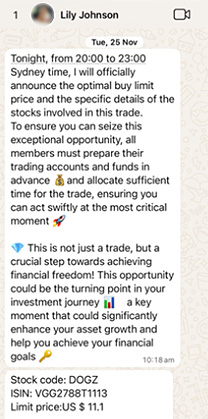
The Scammers may also promote different scam “strategies” based on how much money participants are willing to invest.
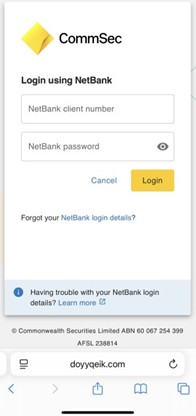
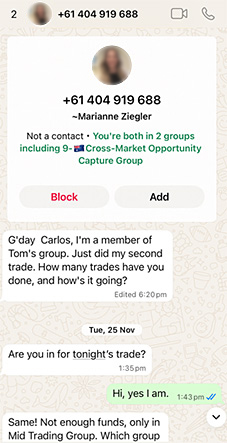
If you’ve come across or been invited to any Facebook group, or have provided your phone number to a WhatsApp group, please call us on 13 15 19 and also report the scam to hoax@cba.com.au.
Secure your CommSec account
CommSec has additional security features that provide an extra level of safety to your account. These only take a few minutes to set up on the CommSec website.
- Verbal phone PIN
A 6-16 digit numerical PIN that can be used to identify you when you call us.
- Security questions & answers
These questions will be used to identify you if you forget your password, or whenever we need extra verification.
- Trading password
To add an extra level of security to your account, you can use trading password when placing orders via the CommSec website, CommSec Mobile app or CommSec IRESS. This password is different to your login password.
- SMS security
SMS-based two-factor authentication (2FA) and SMS one-time passwords (OTP) allow you to verify your identity with a code, sent to you via text message.
Set up these security features on the CommSec website:
1. Log into CommSec
2. Select Settings
3. Go to Security & Passwords section
4. Select the feature you want to enable
CommSec is not liable for any losses resulting from the scams of third parties that have compromised your CommSec credentials.
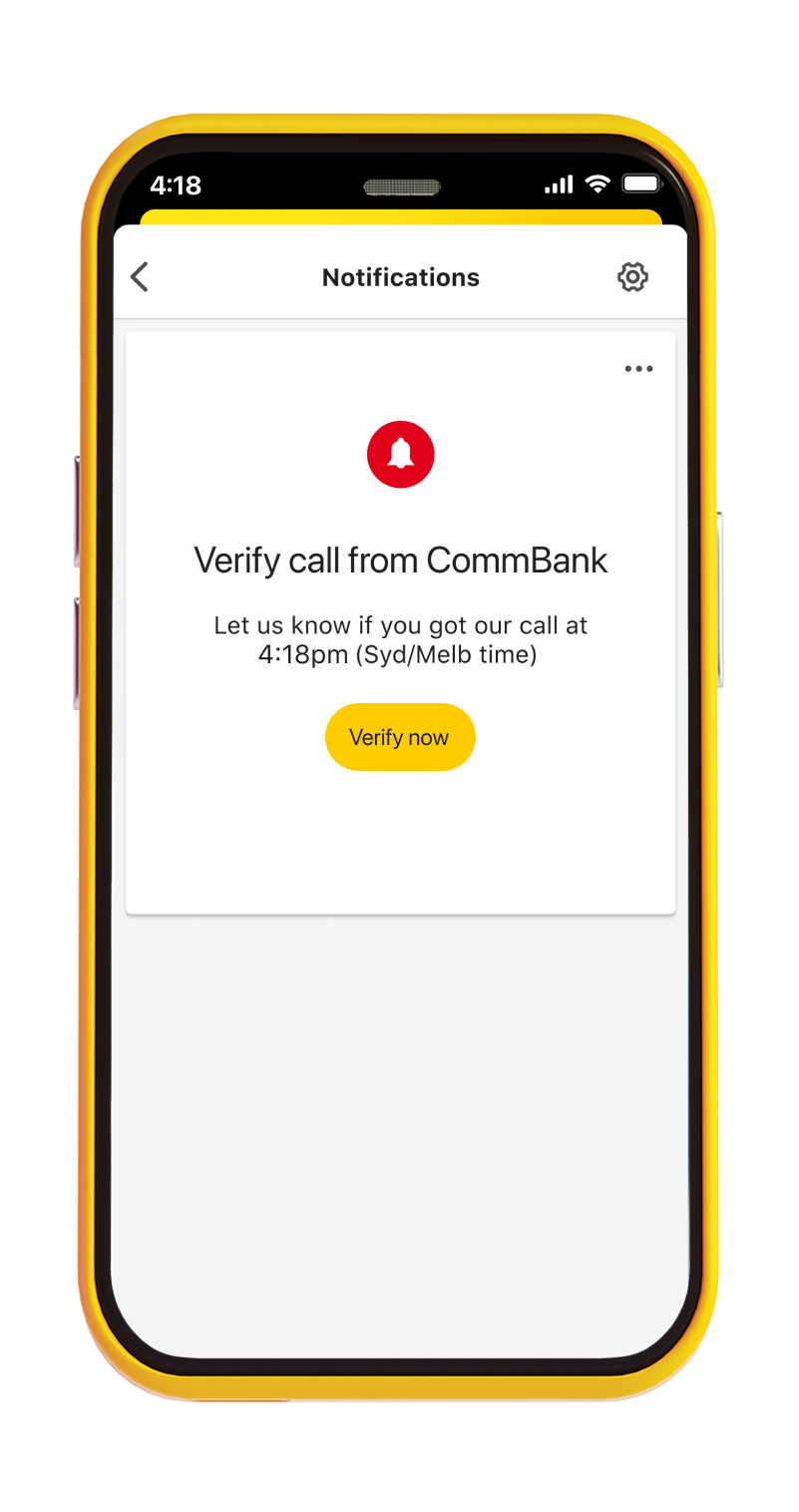
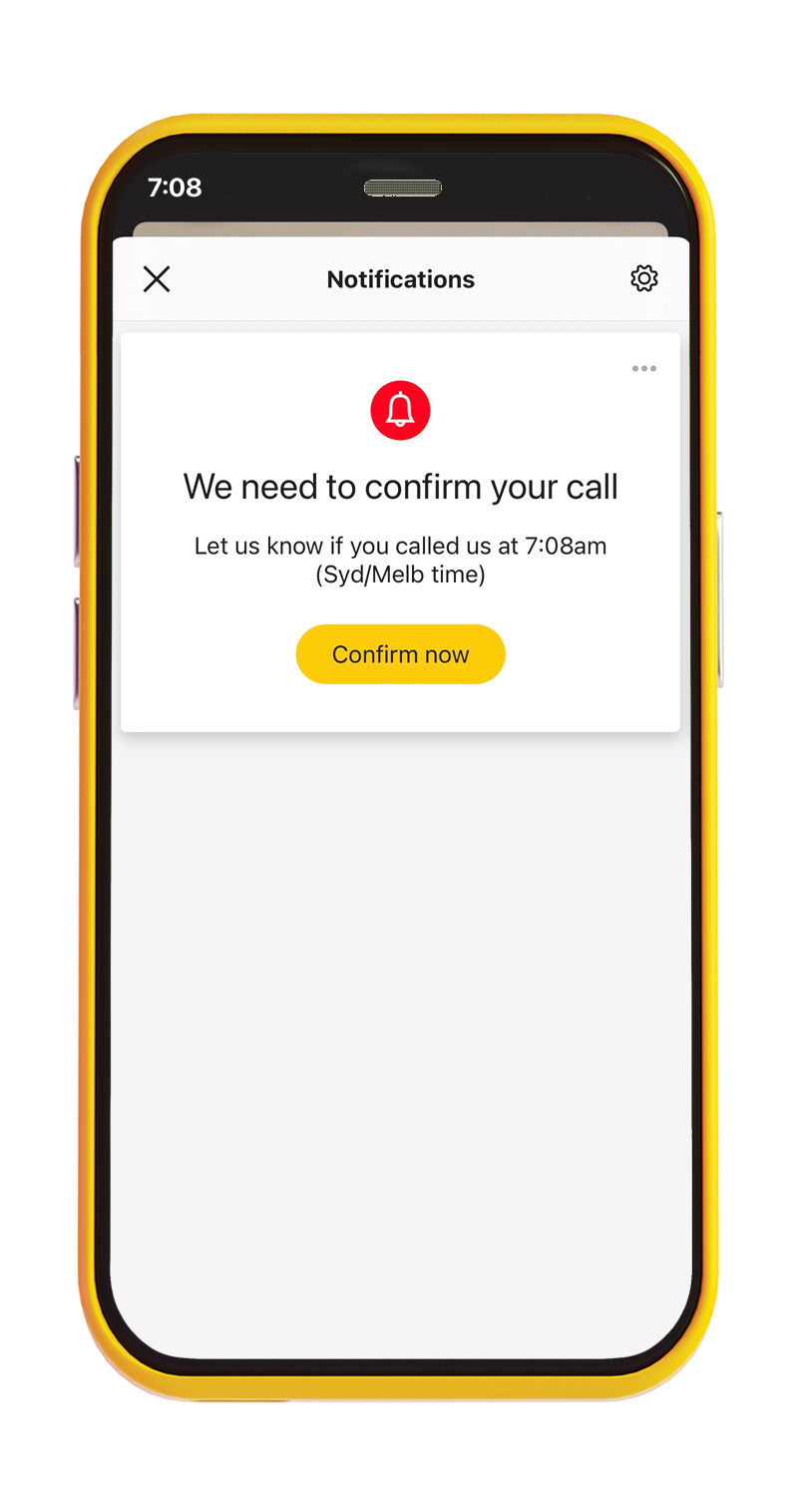
Verify your calls with CallerCheck
What is CallerCheck?
CallerCheck allows you to confirm if a caller claiming to be from CommSec or CommBank is legitimate, by triggering a security message in your CommBank app.
We also use CallerCheck to make sure we’re speaking with the right person when receiving and making calls, before we share any details about your account.
It’s our preferred way of identifying you over the phone safely.
CallerCheck is only available for CommSec customers who are CommBank app users. You'll need to have version 4.37 or newer of the CommBank app installed. This feature is not currently available in the CommSec mobile or CommSec Pocket apps.
Find out more about CallerCheck.
Remember 3 simple steps:
Stop. Check. Reject
1. Stop
Does a call, email or text seem off? The best thing to do is to stop and take a breath. Real organisations won't put pressure on you to act instantly.
2. Check
Ask someone you trust or contact the organisation the message claims to be from.
3. Reject
If you're unsure, hung up on the caller, delete the email, block the phone number and change your passwords.
Create strong, unique passwords
Your banking, social and email accounts contain important information that make up your digital identity. Here’s how to create strong passwords to help keep your information safe.
Creating a secure password
- Use a mix of letters, numbers and symbols
- Use as many characters as you can – a longer password is harder to decipher
- Avoid anything that can be easily guessed such as your address or birthday, or common quotes and phrases
- Consider a passphrase: Similar to a password but instead of creating a string of letters, numbers and symbols, use words that tell a story. For example: MyPetGo@tHa$@PhD. It tells a silly story that’s easy to remember, while increasing the unpredictability of your password and making it difficult to guess
Password security
- Don't share your passwords with anyone
- Don’t write your passwords down anywhere
- Make them unique: reusing a password multiple times makes it less secure – it only requires one breach to compromise all the accounts with the same password
- If you have many accounts, setting alphanumeric passwords for each can be difficult to remember. In this instance, you may want to consider using passphrases instead
- When available, enable multi-factor authentication. This adds an additional check to prove your identity. An example might be a code you must enter which is accessed via an authenticator app on your mobile device
Protect yourself from SMS and email scams
We will never send you an email or SMS asking for banking information like your CommSec Client ID, password, or NetCode; or include a link to login directly from the email or SMS.
Always type commsec.com.au into a browser or use the CommSec app to securely access your investing.
How to check if a message is legitimate:
- When contacted by an unsolicited third party, it's better to be over-cautious. Contact the organisation directly using a phone number from their website (not the email or message) before you reply.
- Hover your mouse over a link to see the destination URL (web address), before clicking it. On a smartphone you can press and hold a link to inspect it. Carefully read these URLs, as they’re often created to look similar to legitimate addresses.
Reduce your risk of being scammed by paying close attention to messages or emails that:
- Aren't quite right – scammers may use similar email addresses (e.g. @combank.com or @Comsec.com) and copy the look and feel of official messages to trick you into thinking a message is legitimate
- Have spelling mistakes and incorrect grammar
- Include an urgent call to action, such as asking you to unlock or verify an account, or log on and pay a traffic infringement notice. They might also contain malicious software (also known as malware) designed to infect your machine and steal data over time
Read all SMS security code messages carefully. Only enter a security code if you'd like to authorise the activity. Never share your security code with anyone, including CommBank & CommSec.
Secure your computer & mobile phone
Your phone and computer carry a lot of your personal information, so we want to help you protect them against malware, fraud and scams.
Protect your computer by:
- Enabling automatic updates to ensure you always have the latest operating systems and software
- Never downloading remote access software at the request of a third party
- Always downloading software from a reputable source
- Ensuring you have the right level of protection for your laptop and computers. Anti-virus software protects against viruses, spyware, malware, phishing attacks, spam attacks and other online cyber threats
- Keeping your anti-virus software up to date and check regularly that it still meets your needs
Protect your device by:
- Using a PIN, password or biometrics
- Keeping your operating system up to date
- Using the latest version of the CommSec app
- Disabling apps from any untrusted sources
- Keeping hardware restrictions on your phone. Do not jailbreak (Apple) or root (Android) in order to install unapproved third party apps or features
- Not downloading remote access software at the request of a third party
- Contacting us if your mobile service is suddenly disconnected or you’re notified of a change of provider without your permission
We're here to help
Have questions about account security or think you've been scammed? Call us immediately.
In Australia: 13 15 19
From overseas: +61 2 8645 2001
8am-6pm Sydney time, Monday to Friday
Received a suspicious message but haven't clicked on it yet? Report it to hoax@cba.com.au
If we've contacted you about a remediation or account review, you might be asked to contact us using these numbers:
• 1300 281 943
• 1300 811 037
• 1300 811 052
If CommSec calls you, the caller ID will be 02 8645 2001.
These are official CommBank and CommSec numbers
If you're unsure, please contact us through our general support
number 13 15 19.
If you think you have been impacted by fraud or scam activity after hours, call CommBank on 13 22 21.